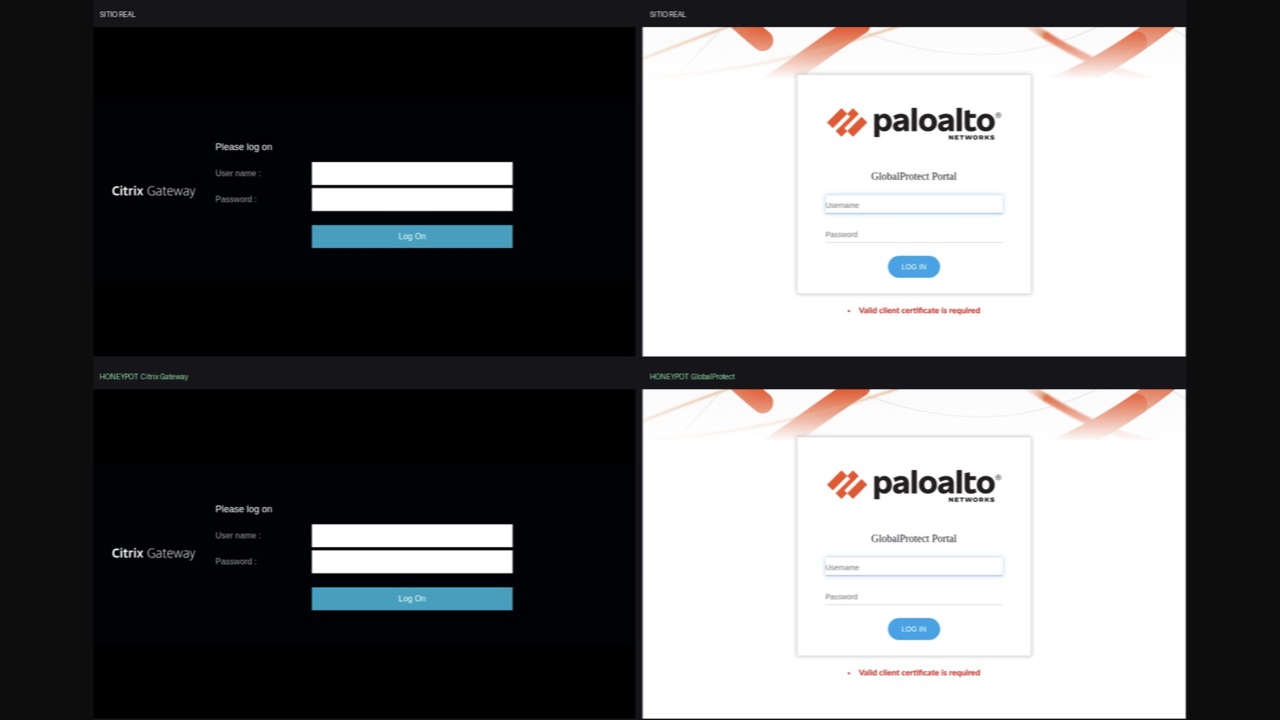
Sometimes the best way to understand how you are being attacked is to leave a fake door open.
A week ago we alerted our customers to active exploitation of a Citrix NetScaler 0-day before any CVE had been published. Several of our Threat Intelligence sources were seeing something that still had no name. When that happens, the useful question is not “which CVE is it?” but “how do I get a close look at this without putting real infrastructure at risk?”
Today we are publishing the answer: two open source honeypots that imitate VPN portals and record everything an attacker does against them.
What we just released
| Element | Detail |
|---|---|
| What they clone | Citrix Gateway (NetScaler) and Palo Alto GlobalProtect |
| What they capture | Credentials, IP, geolocation, organization, user-agent and exact path |
| How they alert | Telegram in real time — bot, group and topic |
| Where it lives | github.com/merabytes/vpn-honeypots |
| License | Open source |
Why a VPN honeypot and not any other
VPNs are the favourite entry point of every initial access campaign: they are internet-facing by design, they concentrate the authentication of the whole company and they tend to accumulate critical CVEs. Almost every major initial access incident of the last few years started on one: NetScaler, GlobalProtect, Pulse, Fortinet.
The problem is that the telemetry you get from those attempts is poor. Your VPN log tells you someone failed a login. It does not tell you which credential they tried, from where, which user-agent they carried, or what they did before and after. A honeypot does. Anyone who reaches it is, by definition, an attacker — there are no false positives to triage.
The two we released
| Honeypot | What it clones | Dev port | Tests |
|---|---|---|---|
citrix-gateway/ |
NetScaler Gateway / Citrix Gateway with Receiver for Web | 8443 | 65 |
globalprotect/ |
PAN-OS GlobalProtect portal | 8444 | 49 |
Each folder is self-contained: you can copy it to a server and run it there with no dependency on the other. The development ports differ on purpose, so both honeypots can run at the same time on the same machine.
They are 1:1 clones, not mock-ups
A honeypot that looks like a honeypot is worthless. That is why we did not build a look-alike screen: we capture the real portal and serve it as-is.
python3 download.py --host my.company.com
It downloads the logon page and everything hanging from it —HTML, CSS, JS, images, fonts and the XML/JSON endpoints the client queries— and stores it in static_cache/ with the same URL structure as the original. It only performs passive GET/POST against the same host; third-party resources (reCAPTCHA, CDNs) are left pointing outside, exactly as in the original.
From there:
download.pycaptures the portal and stores the host as the `` placeholder.app.pyserves that copy, replicating the URL tree, status codes and headers of the original, rewrites `` to the host of each request and stores the credentials.run.shsets up the environment (venv+requirements.txt) and starts the app.
The details that let the copy survive inspection: the only Server and Date headers leaving the server are the ones app.py sets with the original’s exact spelling — not a single Server: uvicorn — because uvicorn runs with --no-server-header --no-date-header and sits behind the a2wsgi WSGI→ASGI bridge (the asgiref one breaks the second request of every keep-alive connection).
What you see when someone takes the bait
Every capture is written as JSON lines into two files:
| File | Content |
|---|---|
honeypot.log |
Every event: each request and each capture |
creds.log |
Only the CREDENTIAL_CAPTURE events |
{"ts": "2026-10-02T10:08:01Z", "event": "CREDENTIAL_CAPTURE",
 "path": "/nf/auth/doAuthentication.do", "ip": "203.0.113.7",
 "username": "ana.lopez", "password": "…",
 "extra_fields": {"savecredentials": "false"}, "geo": {"city": "Madrid"}}
And the alert that lands in the team’s Telegram, in real time:
🎣 CREDENTIAL CAPTURED (GlobalProtect)
━━━━━━━━━━━━━━━━━━━━━━
👤 User: ana.lopez
🔑 Pass: …
🌐 IP: 203.0.113.7
🌍 Geo: Madrid, Spain (ES)
🏢 Org: Telefonica de Espana
🖥 UA: Mozilla/5.0 (Windows NT 10.0; Win64; x64) …
📍 Path: /global-protect/login.esp
🕐 TS: 2026-10-02 11:22:01 UTC
The Telegram call is synchronous (with a 5 s timeout) on purpose: in a serverless runtime a background thread can die as soon as the response is returned, and losing a capture is the worst thing that can happen to a honeypot. If Telegram rejects it — wrong topic, bot not in the group, expired token — the reason is written to the log.
Up and running in one minute
git clone https://github.com/merabytes/vpn-honeypots.git

cd vpn-honeypots/globalprotect
bash run.sh --dev      # uvicorn on :8444 with autoreload
bash run.sh            # production on :443, 4 workers
Same thing in citrix-gateway/, which uses 8443 in development by default. For alerts to leave the server, the three Telegram variables:
export TELEGRAM_BOT_TOKEN=123456789:AA...
export TELEGRAM_CHAT_ID=-1001234567890
export TELEGRAM_TOPIC_ID=42
bash run.sh
Before trusting it, check that the bot can post where you want it to:
curl -s -X POST "https://api.telegram.org/bot<TOKEN>/sendMessage" \
  -d chat_id=<CHAT_ID> -d message_thread_id=<TOPIC_ID> \
  -d text="alert test" | jq '{ok, description}'
And to verify the honeypot behaves like the original:
.venv/bin/python test_e2e.py     # 65 tests (citrix) / 49 (globalprotect)
.venv/bin/python tail_log.py     # live captures, already formatted
Three design decisions we care about
- No branding. On capture, the original host is replaced by the `` placeholder and rewritten on every request to the host the attacker came in through. The same
static_cache/serves any domain and the portal it came from appears nowhere in the code or in what is served. The only place that mentions it is_meta.json, the capture record. - Zero traffic to the original system. There is no proxy: everything comes from
static_cache/. The honeypot works even if the real portal is down at that moment, and nothing the attacker does ever reaches anyone’s system. - Same server in dev and in production. The only difference between development and production is the port and the workers. The code serving the honeypot is identical, so what you test is what you deploy.
In enterprise we go one step further
In our enterprise deployments the capture does not stay in a file or a Telegram message: we capture the full honeypot telemetry and logs and integrate them directly into the SOC panel, correlated with the rest of the customer’s telemetry.
That changes the conversation. An authentication attempt against the fake door stops being an isolated log and becomes the first indicator of a campaign: if the same actor tried credentials against your fake VPN 20 minutes ago, we have context before they touch the real one.
Adding your own VPN portal
The repo is built to grow. Copy the folder closest to whatever you want to emulate, change the seeds in download.py (the portal endpoints) and the logon page and vendor-specific responses in app.py. Everything else — crawler, host rewriting, static server and capture — is shared.
Conclusion
You do not have to wait for the CVE to understand an attack. When several intelligence sources point at something that still has no name, having a fake door open is the cheapest way to learn who is calling, with which credentials and from where.
Now you can set it up yourself.
🔓 Open Source — github.com/merabytes/vpn-honeypots
#honeypot #citrix #netscaler #paloalto #globalprotect #vpn #threatintelligence #threathunting #opensource #merabytes
Want this level of visibility over your infrastructure, with honeypot telemetry wired into a 24/7 SOC? Let’s talk.
Frequently asked questions
An Adversary-Aware SOC goes beyond traditional security monitoring by understanding attacker tactics, techniques, and procedures (TTPs). We proactively hunt for threats using MITRE ATT&CK framework, behavioral analysis, and threat intelligence to detect attacks that bypass conventional security controls.
Traditional security tools focus on known signatures and indicators. Our behavioral detection analyzes anomalies in user activity, email patterns, network traffic, and system behavior to identify sophisticated attacks that use legitimate tools or bypass authentication controls. This caught the attacks in these case studies before significant damage occurred.
Our SOC operates 24/7 with real-time monitoring and automated response capabilities. Critical alerts trigger immediate investigation and containment actions within minutes. We provide continuous threat hunting, forensic analysis, and coordinated incident response to minimize impact and prevent lateral movement.
We combine global threat intelligence feeds with our own research from real incidents. Every attack we analyze contributes to our detection rules and IOC database, which is immediately shared across all protected environments. This means if we see a new attack pattern targeting one client, all clients are automatically protected within hours.
Absolutely. Our SOC integrates with your existing EDR, XDR, SIEM, firewalls, email security, and identity protection tools. We enhance their effectiveness by correlating events across all sources, applying adversary-aware detection logic, and providing expert human analysis that automated tools alone cannot achieve.